> ## Documentation Index
> Fetch the complete documentation index at: https://docs.budecosystem.com/llms.txt
> Use this file to discover all available pages before exploring further.
# Cluster Settings and Storage Defaults
> Configure storage classes and access modes for consistent deployments
## Why Settings Matter
Cluster-level settings reduce deployment drift by standardizing how persistent storage is provisioned.
## Settings Model
```mermaid theme={null}
flowchart LR
A[Discover Storage Classes] --> B[Choose Default Storage Class]
B --> C[Set Default Access Mode]
C --> D[Save Cluster Settings]
D --> E[Applied to New Deployments]
```
## Configure Default Storage Class
1. Open **Clusters** and select the target cluster.
2. Go to **Settings**.
3. Load available storage classes returned by the cluster.
4. Select the preferred default class.
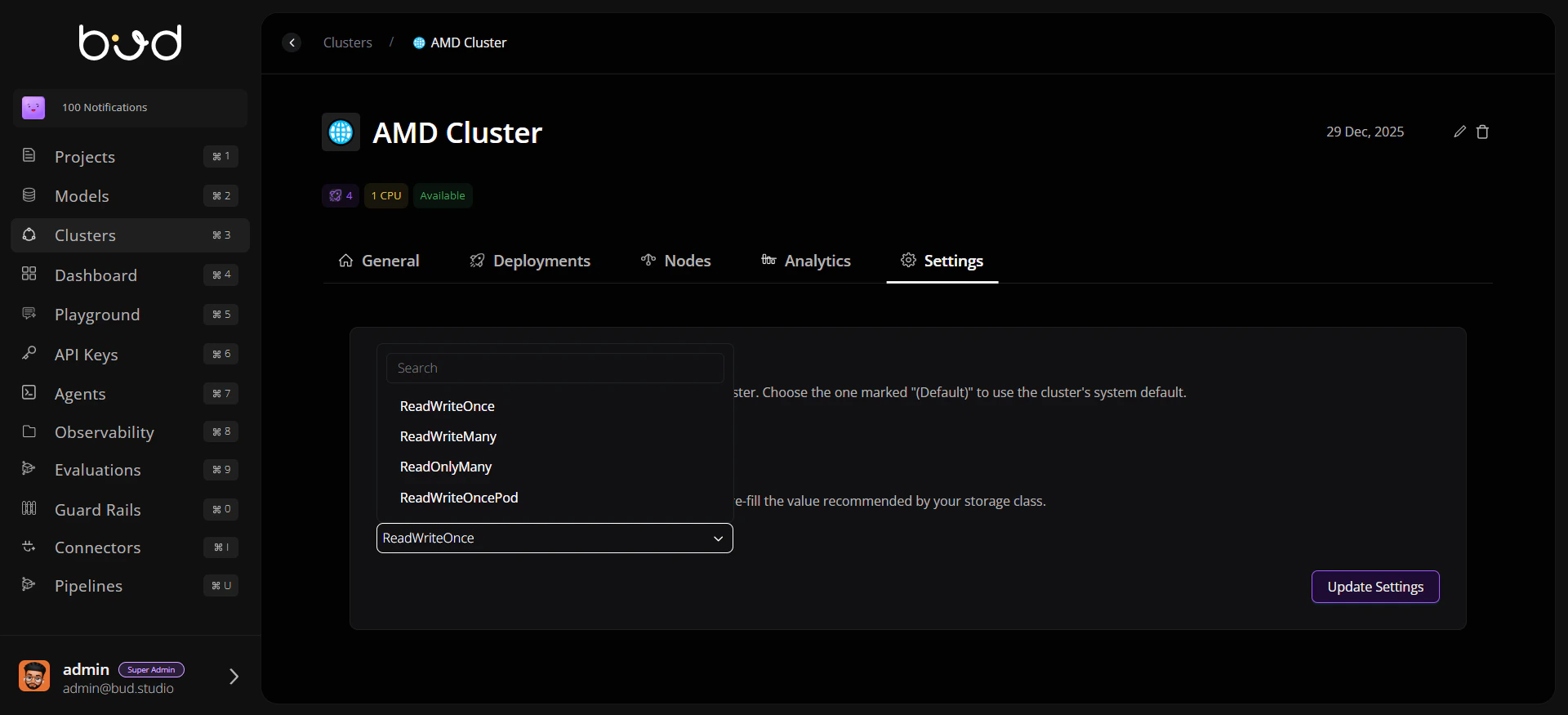
## Configure Access Mode
1. Pick default access mode (`ReadWriteOnce`, `ReadWriteMany`, etc.).
2. Prefer the recommended mode shown by storage class metadata.
3. Save changes and verify values persist on reload.
 ## Validation Checklist
* Storage class list loads without API errors.
* Selected values remain after refresh.
* New deployments inherit expected storage defaults.
## Operational Guardrails
Use production-approved storage classes only.
Document rationale when deviating from recommended access mode.
Revalidate settings after cluster upgrades or CSI changes.
## Troubleshooting Signals
```mermaid theme={null}
flowchart LR
A[Settings Load Fails] --> B[Check Cluster Connectivity]
B --> C[Confirm Storage Class API Response]
C --> D[Retry Save]
D --> E[Escalate with Logs if Persistent]
```
## Validation Checklist
* Storage class list loads without API errors.
* Selected values remain after refresh.
* New deployments inherit expected storage defaults.
## Operational Guardrails
Use production-approved storage classes only.
Document rationale when deviating from recommended access mode.
Revalidate settings after cluster upgrades or CSI changes.
## Troubleshooting Signals
```mermaid theme={null}
flowchart LR
A[Settings Load Fails] --> B[Check Cluster Connectivity]
B --> C[Confirm Storage Class API Response]
C --> D[Retry Save]
D --> E[Escalate with Logs if Persistent]
```