
Saving asks for confirmation: Save Deployment Settings (“This will affect how your deployment handles requests”), then Yes, Save Settings. You see “Settings updated successfully” or the reason it failed. Rate-limit, retry and fallback changes apply to live traffic straight away.
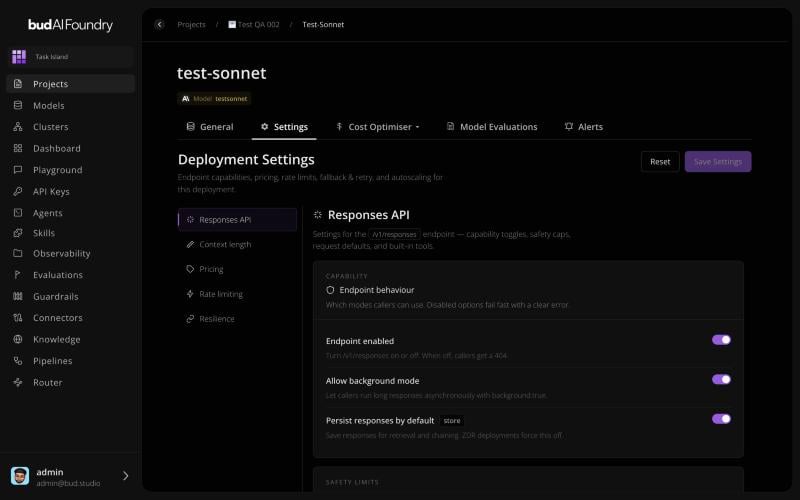
Deployment settings: Responses API behaviour, context length, pricing, rate limiting and resilience.
Responses API
Controls the/v1/responses endpoint on this deployment. It runs on top of chat completions, so it is unavailable until chat completions is enabled for the deployment. Changes affect new requests only.
Reset in this section clears every per-deployment override and falls back to the model’s defaults (Reset Responses API Settings, Yes, Reset). It takes effect at once and cannot be undone.
Context length
How many tokens the deployment’s model reads in one request. Agents compact long conversations against this number, so they need it.Pricing
What each call costs. Cost reports use it and the Cost Optimiser weighs its savings against it. It is separate from the price customers pay (see “Publish a deployment” below).
Voice deployments instead take one price in the unit their calls are metered in; decision-only deployments take one price per input token or per call. Saving shows “Rates updated”; Reset after saving restores the catalogue or simulator rate (“Rates reset”).
Rate limiting
Switch on Toggle rate limiting, choose an algorithm and set at least one limit. “Requests above the limit return 429 with retry-after.”
At least one limit is required when limiting is on (“At least one rate limit is required when enabled”). Limits are shared across all gateway replicas. A limited response carries
X-RateLimit-Limit, X-RateLimit-Remaining, X-RateLimit-Reset and Retry-After headers (Calling models from your applications).